PixelRAG turns screenshots into retrievable context
I break down PixelRAG’s screenshot-first RAG pipeline and give you a copy-ready template for visual retrieval.

PixelRAG turns page screenshots into searchable context for RAG.
I've been building RAG systems long enough to know when one is lying to me. Not maliciously. Just quietly, by flattening everything that mattered. I’d feed it a page with a table, a chart, maybe a diagram with labels that actually explained the whole thing, and the pipeline would cheerfully rip it into text chunks like that was good enough. Then the answer would come back polished and wrong. Or worse, vague in a way that sounded confident.
That’s the part that kept bothering me. Text extraction is convenient, sure, but it throws away the stuff humans use to read: layout, spacing, figure placement, visual hierarchy, the fact that a caption is attached to a chart and not the paragraph above it. I kept seeing systems ask the model to reconstruct meaning from scraps. It works just often enough to fool teams into thinking the problem is solved.
PixelRAG is the first thing I’ve seen in a while that feels like someone admitted the obvious: maybe the page should stay a page. Not a blob of text pretending to be one. The whole system is built around screenshot tiles, vision-language embeddings, and retrieval over images instead of parsed text. That sounds simple until you’ve tried to make a model answer questions about a dense document without breaking its visual structure apart.
What pulled me in was the developer honesty of it. This isn’t a glossy demo with a hidden backend. It’s open source, it ships the pipeline, it ships prebuilt indexes, and it even gives you a hosted API you can hit without an API key. That combination is rare enough that I wanted to unpack it properly instead of just bookmarking it and forgetting why it felt different.
I’m basing this breakdown on the EveryDev.ai listing for PixelRAG, which points to the upstream work from Berkeley SkyLab, BAIR, and the Berkeley NLP Group. The source page describes the architecture, the hosted Wikipedia index, the Claude Code plugin, and the self-hosting path. I’m not repeating marketing copy here; I’m translating the parts that matter if you actually need to build with it.
Stop pretending text is the whole document
Get the latest AI news in your inbox
Weekly picks of model releases, tools, and deep dives — no spam, unsubscribe anytime.
No spam. Unsubscribe at any time.
“PixelRAG is a pixel-native retrieval pipeline that replaces text chunking with screenshot-based embedding.”
What this actually means is: instead of tearing a document into text chunks and hoping the structure survives, PixelRAG renders the page into screenshot tiles and indexes those tiles directly. The retrieval unit is visual, not textual. That matters because a table is not just words in rows, and a chart is not just labels floating in space.

I ran into this exact failure mode on internal docs with engineering diagrams. Traditional RAG would grab the paragraph that mentioned a component, but miss the diagram that showed how the component connected to everything else. The answer looked plausible right up until someone who knew the system read it. Then it fell apart.
PixelRAG’s bet is that visual structure carries meaning, and the model should see that structure instead of guessing it from extracted text. That’s a pretty blunt correction to the usual RAG habit of over-parsing everything.
How to apply it: if your corpus includes screenshots, slide decks, dashboards, PDFs with dense formatting, or web docs with meaningful layout, stop forcing a text-only pipeline to do all the work. Split the problem into two questions: what should be read as text, and what should be read as an image. If the visual answer matters, keep the visual form in the retrieval path.
- Use screenshot tiles when layout changes the meaning.
- Keep text extraction for prose-heavy material where structure is simple.
- Don’t mix the two blindly; you’ll get a mushy index and weird retrieval.
The practical shift here is not “vision is better.” That’s too vague and usually wrong. The real shift is that retrieval should preserve the information channel that actually encodes the answer. For some documents, that channel is pixels.
The pipeline is boring on purpose, which I like
render → embed → index → servePixelRAG’s pipeline is deliberately modular. The source page describes four stages: render with Playwright CDP or PDF tooling, embed with Qwen3-VL-Embedding, index with FAISS, and serve with FastAPI. That’s not flashy, and honestly that’s why I trust it more than a giant monolith.
What this actually means is you can inspect each failure point separately. If retrieval is bad, you can ask whether the render step mangled the page, whether the embedding model missed the visual cue, or whether the index is too coarse. I’ve spent too much time with systems where every bug looked identical because everything was fused together.
PixelRAG also exposes the stages as installable pieces, which is the right call. The listing mentions commands like pixelshot for rendering, pixelrag chunk / embed / build-index for vectorization and indexing, and pixelrag serve for the API. That means you can test a slice before you commit to the whole stack.
How to apply it: when you build your own visual RAG flow, keep the stages separate in your repo and your mental model. I’d rather have a slightly longer setup than a mystery box. Separate scripts also make it easier to swap a renderer, try a different embedding model, or rebuild just the index without touching the serving layer.
- Render first, then inspect the actual tiles before indexing anything.
- Keep the embedding job reproducible with pinned model versions.
- Expose the search API as a thin layer over the index, not as the place where all logic lives.
That boring structure is a feature. It makes the system debuggable, and debuggable systems are the only ones I want near production data.
Why screenshot tiles beat brittle parsing
“Text extraction discards layout, tables, figures, and styling — signals that make a page legible and answerable.”
That sentence is the whole argument, and I think it’s right. When you parse a page into plain text, you’re making an assumption that meaning survives the conversion. Sometimes it does. Often it doesn’t. Especially once the page starts behaving like a page instead of a paragraph dump.
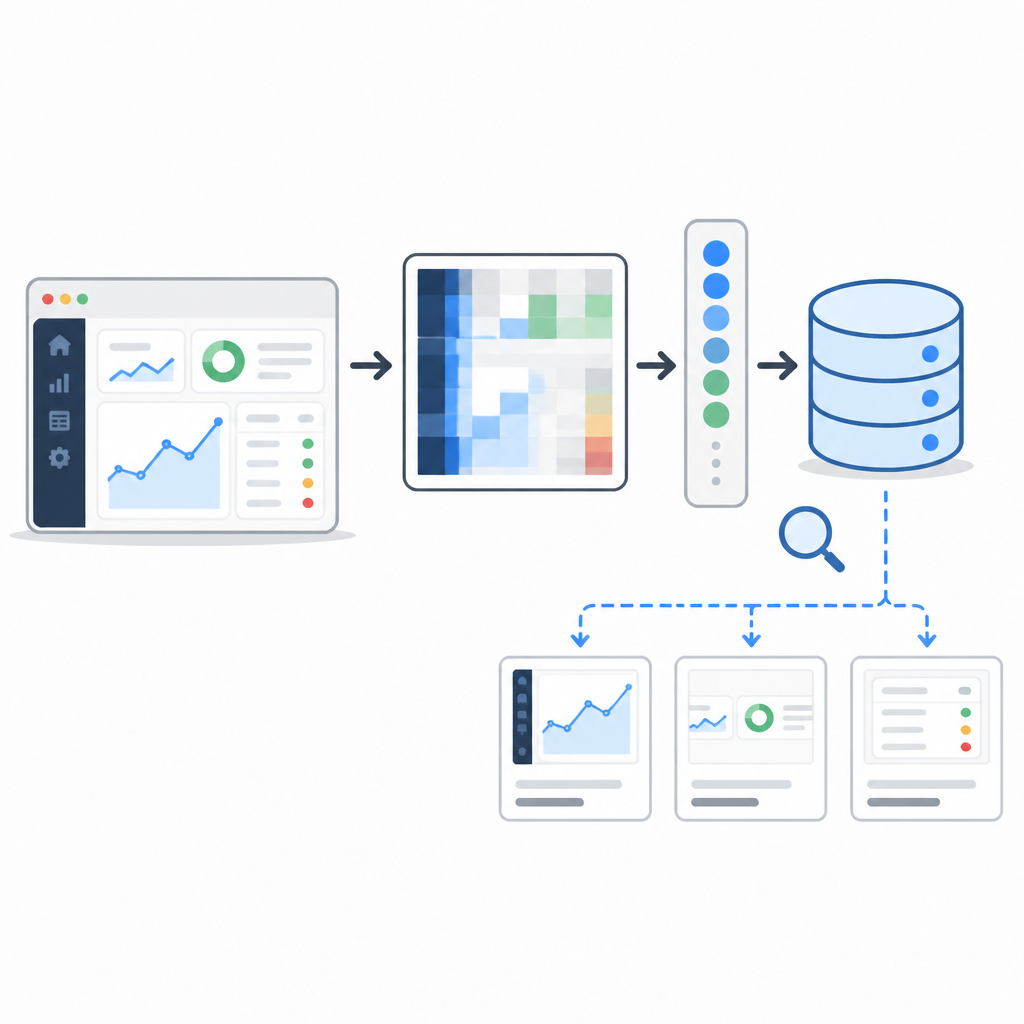
The source page says PixelRAG indexes screenshots into a vector space where tables, charts, layout, and infographics remain intact and searchable. That’s the part I’d underline if I were explaining this to a team that keeps losing time to “why did the model miss the obvious thing on the page?”
I’ve seen this with financial reports, architecture docs, and product specs. The answer is often sitting in a table header, a legend, or a side-by-side comparison. Text chunking tends to separate those cues from the content they explain. Then retrieval brings back the wrong chunk and the generator fills in the rest like an overconfident intern.
How to apply it: if you control the corpus, classify pages by visual density. A clean API reference can stay text-first. A dashboard screenshot, onboarding flow, or research paper figure probably shouldn’t. I’d start with a hybrid corpus and measure whether screenshot retrieval improves top-k relevance on the visually dense subset.
There’s also a design lesson here for prompt builders. If the answer depends on visual arrangement, don’t ask the model to infer that arrangement from extracted prose. Give it the arrangement. Otherwise you’re making the model reconstruct the document from a bad photocopy of the document.
The hosted index is the sneaky useful part
One thing I appreciate: PixelRAG doesn’t make you start from zero. The listing says the hosted public API indexes 8.28M Wikipedia articles across 28.1M screenshot tiles, and it’s available without an API key. That’s a nice way to let developers poke at the idea before they wire up their own corpus.
What this actually means is you can test visual retrieval behavior immediately. You don’t need to spend a day building a toy index just to answer the question “does this even work for the kind of content I have?” That’s the kind of friction that kills adoption in real teams.
The source also says the project ships pre-built FAISS indexes and LoRA adapter weights on Hugging Face, plus the full pipeline source. That’s useful because it turns the project from a paper idea into something I can inspect, run, and adapt.
How to apply it: use the hosted endpoint as a benchmark, not a crutch. Query it with text and with image inputs. See how it behaves on questions that depend on layout. Then compare that against your existing text RAG stack. If the visual version consistently finds the right page or tile faster, you’ve got evidence, not vibes.
If you’re self-hosting, keep an eye on the storage and index footprint. The listing mentions 214 GB of FAISS data and 2048-dimensional embeddings for the Wikipedia index. That’s not tiny. Plan for it like an actual infra decision, because it is one.
The Claude plugin is the part I’d steal first
“The repository includes a Claude Code plugin called pixelbrowse that gives Claude the ability to screenshot any URL and read the resulting image rather than fetching raw HTML.”
This is the most immediately practical piece for agent work. Instead of letting an agent scrape raw HTML and guess at the page structure, the plugin lets it look at the page the way a human would. That means charts, diagrams, tables, and layout are still visible to the model.
I like this because it attacks a real annoyance in agent workflows: web pages are messy, and raw DOM is often a terrible proxy for what the user actually sees. If the agent’s job is to inspect a page, a screenshot is often a better input than the HTML source. That’s not a philosophical statement. It’s just less dumb.
The listing says pixelbrowse calls the local pixelshot CLI and doesn’t require an MCP server or backend. That’s a nice deployment choice because it keeps the browser-read path local and simple. It also means you can plug it into existing tool-use setups without rebuilding your whole agent stack.
How to apply it: if you’re building a browser-capable agent, add a screenshot-read tool before you add more scraping logic. Use it for pages where visual cues matter. Then compare the agent’s success rate against HTML-only extraction. I’d bet the visual path wins more often than people expect.
- Use screenshot tools for dashboards, docs, and admin UIs.
- Keep HTML scraping for form fields and structured metadata.
- Let the agent choose the view, not the other way around.
This is one of those cases where the tool is more important than the model. Give the model the right representation and half the battle is already over.
Self-hosting is the real test, and PixelRAG passes enough of it
The EveryDev listing says PixelRAG runs on Linux with CUDA, macOS with Apple Silicon/MPS, and even has CPU fallback. That matters because a lot of “open source” AI projects are technically open source and practically unusable unless you have a very specific GPU setup.
What this actually means is the project is trying to meet developers where they are. The source page also mentions a simple YAML config for building a custom index from local documents or PDFs. That’s the right shape for a self-hosted tool: one config file, one source directory, one pipeline.
The training side is isolated in a separate train/ project with pinned dependencies, including specific Torch and cuDNN versions. I’m glad they split that out. Training environments are where reproducibility goes to die if you’re careless.
How to apply it: if you want to adapt PixelRAG to your own corpus, start with a small local directory and a tiny index. Don’t begin with your full doc lake. First prove that the rendering, embedding, and retrieval chain produces sane results on 20 or 50 representative pages. Then scale.
Also, don’t ignore the operational cost of visual indexing. Screenshot tiles are heavier than text chunks. That’s the tradeoff. You’re paying storage and embedding cost to preserve meaning that text parsing would have destroyed. In some domains, that trade is absolutely worth it.
The template you can copy
# PixelRAG-style visual RAG template

## When to use
Use this for corpora where layout matters:
- tables
- charts
- diagrams
- PDFs with dense formatting
- web pages where visual placement changes meaning

## Pipeline
1. Render each page into screenshot tiles.
2. Embed tiles with a vision-language embedding model.
3. Store vectors in FAISS.
4. Serve retrieval through a thin HTTP API.
5. Optionally add a browser screenshot tool for agents.

## Minimal config
source_dir: ./docs
output_dir: ./pixelrag-out
render:
  engine: playwright-cdp
  tile_width: 1280
  tile_height: 1600
embed:
  model: Qwen3-VL-Embedding
  batch_size: 16
index:
  type: faiss_ivf
  dim: 2048
serve:
  host: 0.0.0.0
  port: 8000

## Query strategy
- text query: for semantic lookup
- image query: for visual similarity
- hybrid query: for questions that mention both content and layout

## Retrieval policy
- return top-k tiles
- include source page URL or file path
- include tile coordinates
- include thumbnail or rendered preview in the UI

## Agent tool shape
{
  "name": "pixelbrowse",
  "description": "Screenshot a URL and search the page visually",
  "input_schema": {
    "type": "object",
    "properties": {
      "url": { "type": "string" },
      "query": { "type": "string" },
      "mode": { "type": "string", "enum": ["text", "image", "hybrid"] }
    },
    "required": ["url", "query"]
  }
}

## Build checklist
- [ ] render sample pages and inspect tiles manually
- [ ] verify tables and figures survive rendering
- [ ] benchmark against text-only RAG
- [ ] pin model and FAISS versions
- [ ] test text, image, and hybrid queries
- [ ] expose a simple API before adding agent complexity

## Practical rule
If the answer depends on what the page looks like, keep the page as an image in the retrieval path.
If the answer depends only on prose, text chunking is fine.
Don’t force one representation to do both jobs badly.
That template is intentionally plain. I want it to be the thing you paste into a repo, not a thing you admire in a blog post. If you’re adapting the idea, the important part is the rule at the bottom: preserve the representation that carries the meaning.
My own read of PixelRAG is simple. It’s not trying to make RAG magical. It’s trying to stop RAG from being dumb about documents that were never meant to be flattened. That’s a much better goal, and a much more honest one.
Source attribution: I based this breakdown on the EveryDev.ai PixelRAG page at https://www.everydev.ai/tools/pixelrag. The implementation details, hosted index claims, and plugin references come from that listing; the commentary, prioritization, and copy-ready template are mine.
// Related Articles
- [TOOLS]
VDBBench adds cost to vector DB comparisons
- [TOOLS]
Zilliz Adds Cost Metrics to VDBBench
- [TOOLS]
Pixel 11 launch highlights and new Gemini features
- [TOOLS]
AWS Continuum turns AI coding into safer fixes
- [TOOLS]
Open-Generative-AI turns GitHub into a studio
- [TOOLS]
Why benchmark scores don’t predict your bill