OCR 4 turns PDFs into cited RAG input
Mistral OCR 4 turns messy PDFs into ordered, cited data for RAG, with bounding boxes and multi-language support.

OCR 4 turns messy PDFs into cited, RAG-ready data.
I've been building document pipelines long enough to know when something is technically impressive but still kind of annoying to use. OCR is usually one of those things. It pulls text out, sure. Then you spend the next hour trying to figure out what came from a table, what was a footnote, what got flattened, and why your retrieval layer is now confidently quoting the wrong paragraph like it has a degree in lying.
That’s why Mistral AI’s OCR 4 caught my attention. Not because it promises magic. I’ve heard enough magic. What got me was the framing: this isn’t just extraction, it’s document understanding for downstream systems that need structure, citations, and source traceability. That is a much more useful promise for people actually shipping RAG systems, search, and internal assistants.
The original report is from AI Business, written by Esther Shittu. The piece quotes Omdia analyst Mark Beccue and lays out what Mistral says OCR 4 does: ordered, interleaved text and images, bounding boxes, multi-language support, and pricing tied to pages processed. That’s the bit I wanted to unpack, because the details matter more than the headline.
OCR is not the win. Preserving the document is the win.
Get the latest AI news in your inbox
Weekly picks of model releases, tools, and deep dives — no spam, unsubscribe anytime.
No spam. Unsubscribe at any time.
“What OCR typically does is just pull stuff out… It does not really look at it and understand it. Whereas this is saying we understand it.”
That quote from Mark Beccue, an analyst at Omdia, is the whole story in one sentence. Traditional OCR gives you text, maybe with some coordinates if you’re lucky. OCR 4 is trying to keep the document’s shape intact while it extracts content.
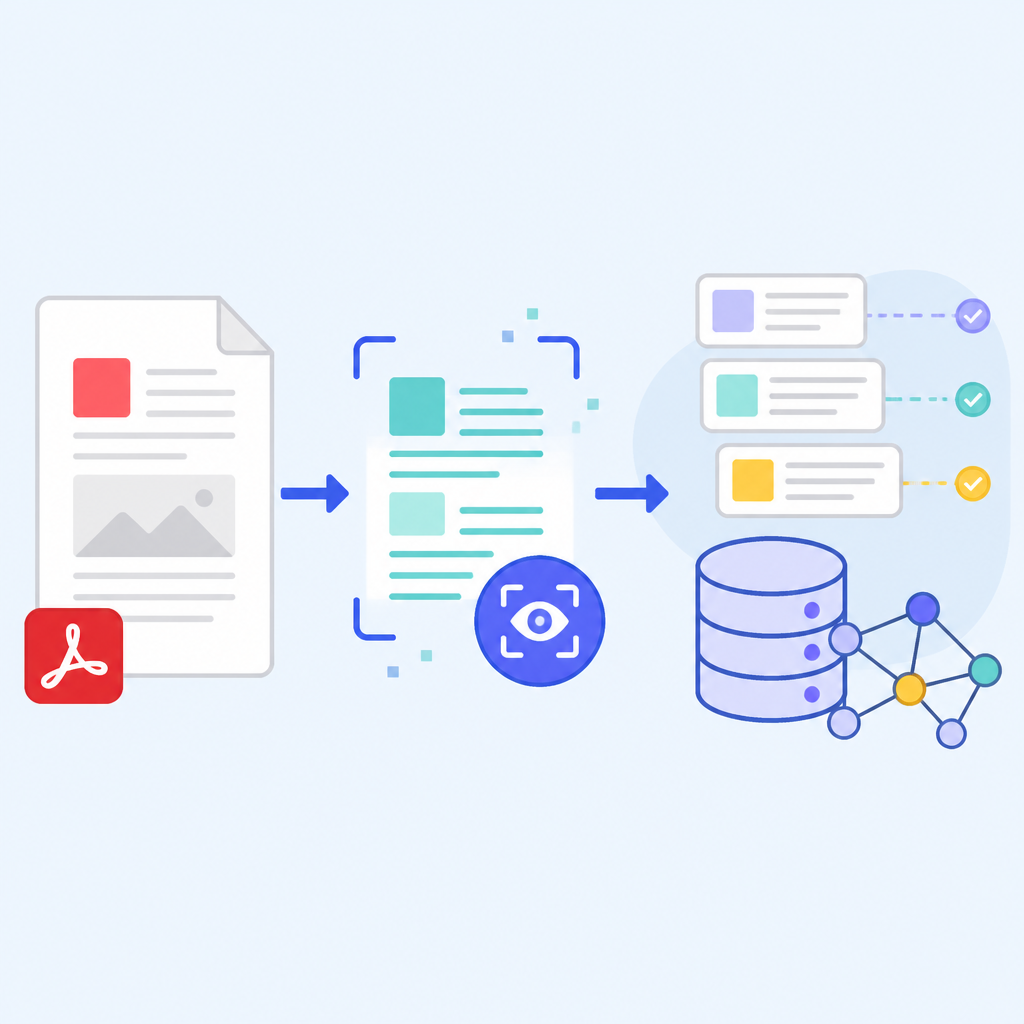
What this actually means is that the model is treating the PDF or image more like a structured artifact than a dumb text blob. Tables stay tables. Equations don’t get mangled into random prose. Images are kept in sequence with surrounding text. If you’ve ever tried to feed a flat OCR dump into a retrieval system, you know how quickly context evaporates.
I ran into this building an internal search tool for scanned policy docs. The OCR output looked fine until a user asked a question that depended on a table header and a note below it. The model answered with a confident mess because the extraction layer had already destroyed the reading order. The problem wasn’t the LLM. The problem was that I’d handed it shredded paper.
How to apply it: stop treating OCR as a preprocessing checkbox. Treat it like the first semantic layer in your pipeline. Ask whether the output preserves reading order, layout, and source offsets. If it doesn’t, your downstream RAG system is going to keep inventing context where none exists.
- Use OCR output that keeps page structure, not just plain text.
- Keep page and span metadata attached all the way through indexing.
- Test retrieval on tables, forms, and mixed media docs, not just clean prose.
Bounding boxes are boring until you need receipts
Mistral’s standout detail here is the bounding boxes feature. The AI Business article says bounding boxes let users localize text, highlight it, and draw boxes over the source document so it’s obvious where the extracted information came from. That sounds small until you’ve had to defend an answer in front of a user who wants proof, not vibes.
What this actually means is traceability. If your assistant cites a policy clause, a contract line, or a compliance note, bounding boxes let you point back to the exact visual location in the source file. That makes citations clickable, auditable, and much easier to trust when the answer matters.
I’ve had too many conversations where a product team said, “Can’t we just cite the document?” and then discovered that “citation” meant a filename and page number, which is barely a citation. People don’t want a treasure hunt. They want the exact spot. Bounding boxes make that possible without making your team manually annotate every page like it’s 2014.
How to apply it: if you’re building document chat, store at least four things for every chunk: the text, the page number, the bounding box coordinates, and the original asset reference. Then build your UI so the answer can jump to the exact region on the page. If you can’t highlight the source, your citation story is weak.
- Use bounding boxes for answer verification and review workflows.
- Expose source highlights in the UI instead of only showing snippet text.
- Keep the original PDF or image accessible for human review.
RAG without layout awareness is a half-built system
The article says OCR 4 is designed for retrieval-augmented generation systems. That’s the right target. RAG is where document intelligence either pays off or falls apart, because retrieval is only as good as the chunks you feed it. If your chunks came from a layout-blind extractor, your retriever is starting from a bad premise.
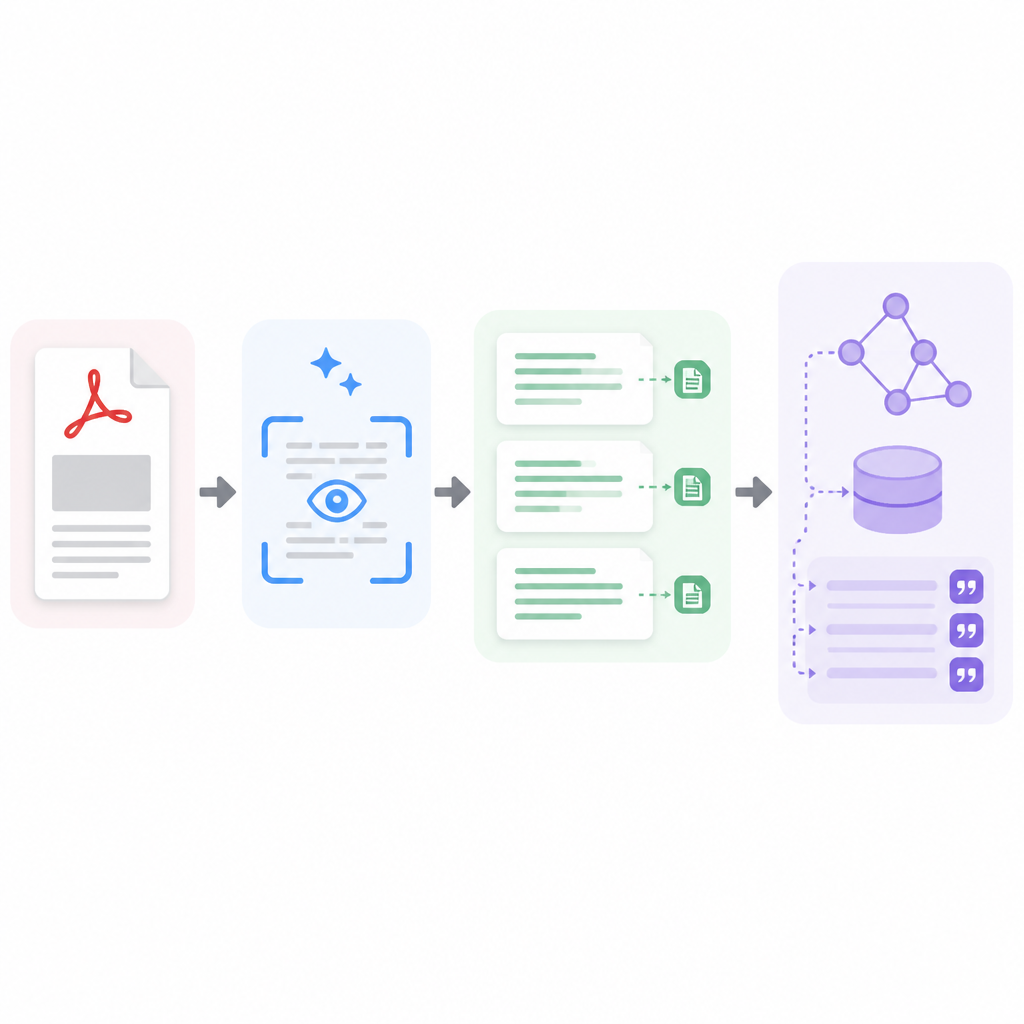
What this actually means is that OCR 4 is not just a document tool. It’s an upstream dependency for search quality. When the model returns ordered, interleaved text and images, it gives the retriever more faithful units to work with. That matters for enterprise content where meaning is spread across captions, tables, formulas, and callouts.
I’ve seen teams spend weeks tuning embedding models when the real issue was chunking. They were splitting paragraphs in the middle of a table note or dropping figure captions entirely. No embedding model can rescue that. You need an extraction layer that respects the document’s native structure before you even think about vector search.
How to apply it: build your RAG pipeline in layers. First extract with layout preserved. Then chunk by semantic blocks, not arbitrary token counts. Then index. Then retrieve. Then answer. If you reverse that order, you’ll get a demo that looks polished and a production system that keeps hallucinating around the edges.
For teams already using LangChain or LlamaIndex, this means your document loader matters more than your prompt template. I’d rather have a boring prompt and clean source structure than a clever prompt built on garbage OCR.
Multi-language support matters because enterprise docs are never mono-lingual
Mistral says OCR 4 supports 170 languages across 10 language groups. That number matters less as a marketing bullet and more as a signal about where the model is meant to live: in global enterprises with messy document estates, not just tidy English-only workflows.
What this actually means is that document intelligence has to deal with the real world. Procurement files, invoices, manuals, legal scans, and support docs often mix languages on the same page. If your OCR falls apart the moment it sees accented characters, non-Latin scripts, or bilingual forms, you’re not building for enterprise. You’re building for a demo.
I’ve watched product teams underestimate this and then get blindsided during rollout. Their pilot worked beautifully in one region, then collapsed when the first batch of documents from another office landed in the queue. The fix was never glamorous. It was always the same: better extraction, better language handling, and better validation.
How to apply it: test on real documents from every region you plan to support. Don’t just sample clean text. Include scans, rotated pages, mixed scripts, stamps, and handwritten notes if they show up in your workflow. If OCR 4 is going to be part of your stack, benchmark it on the ugly stuff first.
If you’re comparing it with other enterprise OCR tools like Google Document AI or Azure AI Document Intelligence, don’t stop at accuracy scores. Check whether the output is usable for search, citation, and review. That’s the real bar.
Speed is nice. Pipeline fit is nicer.
The article says OCR 4 can process up to 2,000 pages per minute on a single GPU, and Mistral also offers it through its API and in Mistral Studio. That’s impressive, but I’ve learned not to get hypnotized by throughput numbers. Fast extraction is only useful if it fits the rest of your workflow.
What this actually means is that Mistral is trying to make OCR 4 practical for both batch jobs and interactive systems. If you’re indexing a document archive, speed helps with cost and turnaround. If you’re powering an assistant, it helps with latency. But throughput alone doesn’t solve the annoying parts: retries, malformed PDFs, charts, and weird scans.
I’ve worked on systems where the bottleneck wasn’t OCR speed at all. It was post-processing. We were normalizing output, reconciling page order, and repairing bad chunks. The extraction step was quick. The cleanup step was the thing eating the budget.
How to apply it: measure end-to-end document latency, not just OCR runtime. Include file ingestion, extraction, chunking, embedding, indexing, and response generation. If OCR 4 saves you time but creates more cleanup work, you haven’t actually won anything.
The pricing in the article is also worth noting: $4 per 1,000 pages via API and $5 per 1,000 pages in Mistral Studio’s Document AI. That gives teams a rough way to compare build-vs-buy tradeoffs, especially if they’re already paying for storage, vector search, and review tooling.
Open source search only helps if the document layer is honest
The piece says OCR 4 is integrated with the Mistral Search toolkit, which is an open source, composable search framework in public preview. That’s the part I’d watch closely if I were building internal search or a document assistant from scratch.
What this actually means is that Mistral is trying to connect extraction and retrieval more tightly. That’s smart. Too many teams bolt OCR onto a search stack after the fact and then wonder why the answers are brittle. If the search layer doesn’t understand page structure, citations, and source regions, it becomes a fancy keyword index with better branding.
I’m a fan of composable systems, but only when the pieces actually talk to each other. Otherwise you just end up with a pile of integrations and a long Slack thread about why the citations don’t line up with the answer text. Been there. Not fun.
How to apply it: if you’re using open source search components, define the contract between OCR and retrieval up front. Decide what a chunk is. Decide how citations map back to pages. Decide how images and tables are represented. Then keep that contract stable across the stack.
And if you want a broader reference point, Mistral’s own product pages are worth reading alongside the article: Mistral AI for the vendor side, and the AI Business report for the enterprise framing. I’d use both, because vendor docs tend to skip the annoying realities and news coverage tends to compress the engineering details.
The template you can copy
# OCR 4-style document pipeline template for RAG

## Goal
Turn scanned PDFs, images, and mixed-layout documents into citation-ready chunks for retrieval and assistant answers.

## Input
- PDF, image, or scanned document
- Optional metadata: source system, document ID, language, owner, access level

## Extraction rules
1. Preserve reading order.
2. Keep text, tables, equations, and images in document sequence.
3. Capture page number for every extracted span.
4. Capture bounding box coordinates for every span.
5. Keep original file reference for audit and review.

## Output schema
{
  "document_id": "string",
  "page": 1,
  "block_id": "string",
  "block_type": "text|table|equation|image|caption",
  "text": "string",
  "language": "string",
  "bbox": {"x1": 0, "y1": 0, "x2": 0, "y2": 0},
  "source_uri": "string",
  "confidence": 0.0
}

## Chunking rules
- Chunk by semantic block, not fixed token size.
- Keep table rows with their headers.
- Keep figure captions attached to the figure block.
- Never split a citation or footnote away from its source block.
- Store chunk provenance: page, bbox, and source URI.

## Retrieval rules
- Retrieve by semantic similarity first.
- Re-rank using page proximity and block type.
- Prefer chunks with direct source provenance.
- Return citations as clickable page regions, not just text snippets.

## Answering rules
- Answer only from retrieved chunks.
- Quote the exact source span when possible.
- If the answer depends on a table or figure, show the highlighted region.
- If evidence is weak, say so plainly.

## Validation checklist
- [ ] Reading order preserved
- [ ] Tables intact
- [ ] Mixed-language pages handled
- [ ] Bounding boxes stored
- [ ] Citations link to source regions
- [ ] OCR output tested on ugly scans
- [ ] End-to-end latency measured

## Practical prompt for the assistant
You are answering questions from extracted documents.
Use only the provided chunks.
Cite the page and highlighted source region for every factual claim.
If the evidence is incomplete, say what is missing.
Do not invent missing context from nearby text.

## Example chunk
{
  "document_id": "policy-2026-04",
  "page": 12,
  "block_id": "p12-b3",
  "block_type": "table",
  "text": "Retention period: 7 years; Exceptions: legal hold",
  "language": "en",
  "bbox": {"x1": 112, "y1": 404, "x2": 1450, "y2": 612},
  "source_uri": "s3://docs/policy-2026-04.pdf",
  "confidence": 0.97
}
This is the part I’d actually copy into a real project. It’s not fancy, but it forces the right habits: preserve structure, keep provenance, and make citations visible. That’s what OCR 4 is really pushing toward, whether you use Mistral’s model or something else.
If I were rolling this out tomorrow, I’d start with one ugly document set, one retrieval use case, and one review UI. I’d ignore the temptation to optimize everything at once. First make the document faithful. Then make the answer trustworthy. Everything else can wait.
Source attribution: the core reporting and quoted details come from AI Business’s article on Mistral OCR 4. My template and implementation advice are original, based on the article’s claims and common document-pipeline practice.
// Related Articles
- [TOOLS]
AWS Continuum turns AI coding into safer fixes
- [TOOLS]
Open-Generative-AI turns GitHub into a studio
- [TOOLS]
Why benchmark scores don’t predict your bill
- [TOOLS]
MCP Servers for Developers: 8 workflow gains in 2026
- [TOOLS]
Doubao turns a game prompt into a mini arcade
- [TOOLS]
Coding Plan turns Alibaba Cloud into IDE billing