Five patching steps that fit distributed estates
A developer-friendly breakdown of five patch management moves that keep distributed systems visible, prioritized, tested, automated, and audited.

Five patching steps that keep distributed systems visible, prioritized, tested, automated, and auditable.
I've been around enough distributed estates to know the pattern. Someone says patching is “handled,” and then a store laptop sits on an old build for six weeks, a POS box misses a reboot window, and nobody notices until a scanner starts failing or a vuln scan lights up like a Christmas tree. The annoying part is that patching usually isn’t hard in theory. It’s just messy in practice. You’ve got stores, warehouses, offices, edge boxes, cloud workloads, and a pile of exceptions nobody documented properly. So the process turns into Slack pings, spreadsheet archaeology, and one tired engineer clicking through dashboards at 11 p.m.
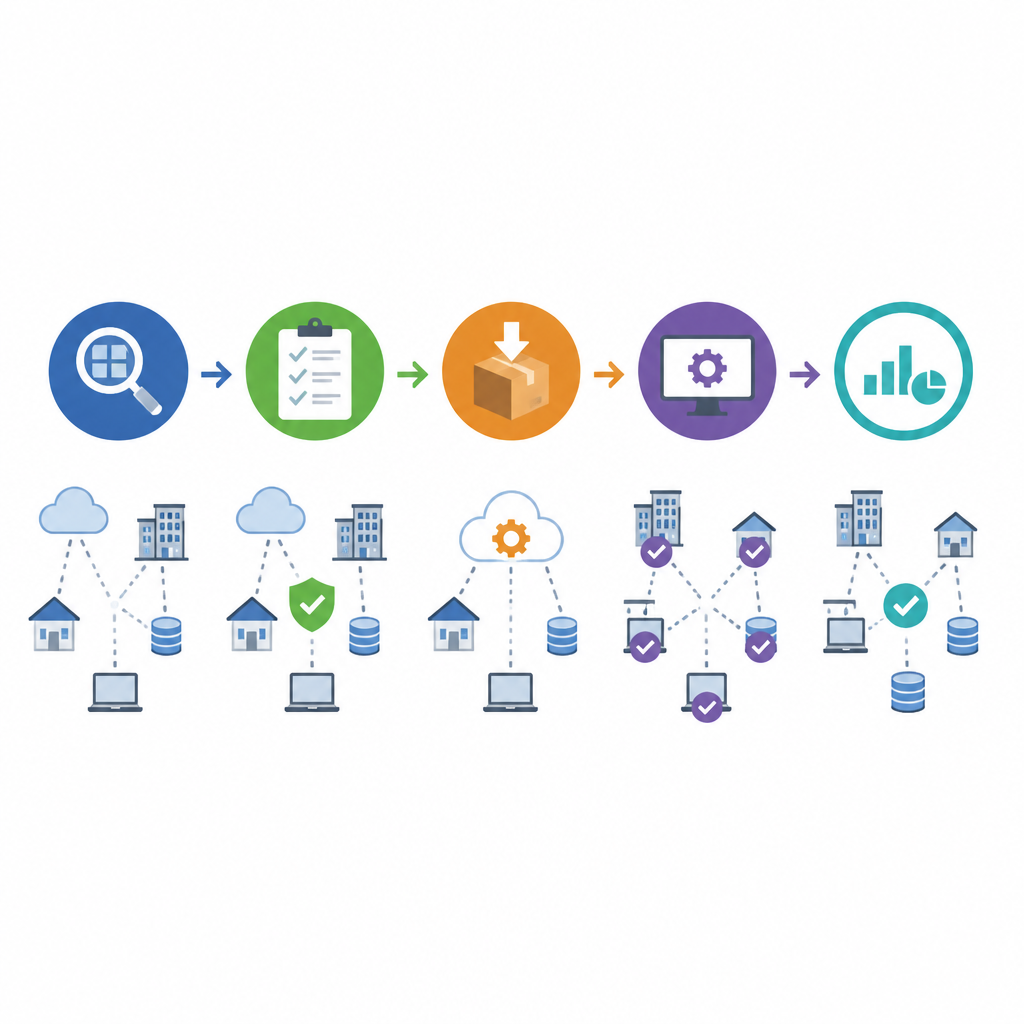
What I liked about the Retail Technology Innovation Hub piece is that it doesn’t pretend patching is a magic button. It breaks the problem into five moves that actually map to how teams work: see everything, rank what matters, test before you blast, automate the rollout, and verify the thing really landed. That’s the whole game. If you’re managing endpoints across branches, remote sites, and edge systems, those five steps are the difference between a controlled maintenance routine and an incident with a polite name.
The article also anchors the urgency with some uncomfortable numbers: exploited vulnerabilities showed up in 20% of breaches in 2025, up 34% year over year, and the average breach cost was cited at $4.44 million. That’s not abstract risk. That’s what happens when patching is treated like admin work instead of operational discipline.
1. Stop pretending you can patch blind
Get the latest AI news in your inbox
Weekly picks of model releases, tools, and deep dives — no spam, unsubscribe anytime.
No spam. Unsubscribe at any time.
You cannot patch what you cannot see. The first step is a live inventory of every device, operating system, and application across all locations.
What this actually means is that “asset inventory” is not a quarterly spreadsheet someone updates when they remember. It has to be live, or close enough to live that you trust it when a vuln drops on a Friday. In a distributed setup, the stuff that hurts you is usually the stuff nobody remembers owning: a kiosk image, a back-office PC, a forgotten VM, a thin client in a regional office, a device that was moved and never re-enrolled.

I ran into this on a retail rollout where every store claimed it had the same build. It didn’t. One region had an old Java runtime because the installer failed silently months earlier, and no one noticed until a scanner report came back ugly. That’s the real cost of blind spots. You don’t just miss one patch. You miss the entire decision tree that depends on knowing what exists.
The article’s recommendation is straightforward: automated discovery. I agree, but I’d say it even more bluntly. If discovery isn’t automated, it drifts immediately. People leave. Devices move. Images get cloned. Exceptions pile up. Your inventory becomes fiction.
How to apply it: build a source of truth that pulls from endpoint management, cloud inventory, network scans, and application management tools. Then reconcile them. Don’t wait for a monthly cleanup. Make drift visible daily.
- Track device ID, owner, OS, app versions, and last-seen time.
- Flag unmanaged or stale assets automatically.
- Require asset registration before anything can be called “in scope.”
2. Rank patches by real risk, not noise
Prioritise by severity and, above all, by what attackers are actively exploiting.
This is where a lot of teams get lazy. They sort by CVSS, maybe by vendor urgency, and call it a day. But severity alone is a bad guide. A medium-severity issue on an internet-facing edge device can be more dangerous than a high-severity issue on a locked-down internal box that nobody can reach.
The source article points to the CISA Known Exploited Vulnerabilities Catalog as a practical guide. That’s the right instinct. I’d rather patch what’s being actively used in the wild than spend a week polishing the least likely thing on the board. If you want a second reference point, the NIST National Vulnerability Database gives you broader context, but CISA’s KEV list is the sharper operational filter.
I’ve seen teams burn days arguing about patch order while an exploited flaw sat on a VPN appliance. That’s backwards. The question is not “what is theoretically bad?” The question is “what gets me owned this week?”
How to apply it: create a priority model with at least four inputs: exploit activity, exposure, business criticality, and patch complexity. Then sort by score, not by whoever shouted loudest in the meeting.
- Patch KEV-listed issues first when they touch exposed systems.
- Escalate anything affecting revenue systems or identity infrastructure.
- Defer low-exposure, low-impact issues into scheduled maintenance windows.
3. Test like production is going to fight back
Test updates in a staging environment before rolling them out.
What this actually means is that patching is also change management, whether people want to admit it or not. A patch can fix a vulnerability and still wreck your day by breaking a driver, a plugin, a payment app, or some ancient service wrapper nobody wants to touch because “it’s been stable for years.” That phrase always makes me nervous.
The article calls out staging and rollback, and that’s exactly the right pair. Testing without rollback is optimism with a dashboard. Rollback without testing is just a nicer way to say “we’ll panic later.” You need both.
I’ve had environments where a patch looked clean in the lab and then failed on one hardware model in stores because the vendor image had a weird dependency chain. The fix wasn’t to stop patching. The fix was to make the test set more honest. If your staging environment doesn’t include the weird stuff, it’s not staging. It’s theater.
How to apply it: define a test matrix that includes the systems most likely to break and the ones most expensive to break. Then make rollback part of the runbook, not a tribal-memory skill.
- Test on representative hardware, not just a golden VM.
- Validate app launch, login, printing, scanning, and payment flows where relevant.
- Document rollback steps with timing, owners, and trigger conditions.
4. Automate rollout or accept chaos
Centralised, automated deployment is what makes distributed patching realistic.
This is the section where the article gets the most practical. And honestly, it’s the part most teams resist until they’re drowning. Manual patching across hundreds or thousands of endpoints is a bad use of human time and a great way to create inconsistent results. Someone forgets a site. Someone reboots too early. Someone closes a ticket before the patch actually installs. Then you’re reconciling three tools and a spreadsheet that all disagree.
Automation handles scheduling, staggered rollouts, and rollback if something goes wrong. That’s not just convenience. It’s how you shrink the time between disclosure and protection. The source notes that the exposure window still averages around a month for many edge and remote systems. A month is an eternity when attackers are scanning for known flaws.
I like staggered rollout because it respects reality. Push to a small slice first. Watch for failures. Expand when the signal is good. That gives you enough control to catch problems without freezing the whole estate for a week.
How to apply it: use a central patch platform, set rings or waves by site criticality, and automate approval gates based on health checks. If you don’t have wave-based deployment, you don’t have a rollout strategy. You have hope.
- Start with non-critical endpoints and expand in phases.
- Schedule around store hours, maintenance windows, and regional time zones.
- Use health checks to stop rollout when failure rates spike.
5. Verify the patch landed, then prove it
Deploying a patch is not the same as confirming it landed.
This is the part people skip because the ticket says “completed” and everyone wants to move on. Bad idea. A deployment job finishing only tells you the command ran. It does not tell you the device rebooted, the version changed, or the vulnerable component is gone. In distributed environments, that gap is where compliance failures and security gaps hide.
The article’s point about continuous monitoring is the one I’d keep pinned above every ops board. You need verification across every site, every ring, every exception path. If a patch failed on ten remote machines, you want that surfaced immediately, not after the next audit or incident.
I’ve seen teams assume success because the management console looked green. Then a site audit found three devices still on the old build because they were offline during the maintenance window. That’s why verification has to include state, not just job status.
How to apply it: compare intended version against observed version, alert on drift, and keep reporting tied to compliance controls like PCI DSS where relevant. If you can’t produce proof, you don’t really know the patching program is working.
And yes, this is boring work. That’s the point. Good patch management should be boring. The drama means something already went wrong.
Make patching a routine, not a rescue mission
The broader lesson from the article is that patching only works when it becomes a system. Not a hero effort. Not a once-a-quarter cleanup. A system. Visibility feeds prioritization. Prioritization feeds testing. Testing feeds automation. Automation feeds verification. If any one of those breaks, the whole thing gets flaky fast.
That’s why I like this model for distributed estates. It doesn’t ask for perfection. It asks for discipline. And in real operations, discipline beats cleverness almost every time.
If you’re running retail endpoints, warehouse devices, remote laptops, or edge infrastructure, you probably already know the pain. The useful part here is having a simple operating pattern that reduces the guesswork. Once that pattern exists, patching stops being a fire drill and starts looking like maintenance again.
One more thing: don’t let the process become so heavy that nobody follows it. The point is to make the safe path the easy path. If the workflow is painful, people will route around it. They always do.
The template you can copy
# Distributed Patch Management Playbook

## 1) Asset visibility
- Maintain a live inventory of all devices, OS versions, applications, and owners.
- Reconcile endpoint management, cloud inventory, and network discovery daily.
- Flag unmanaged, stale, or unknown assets automatically.

## 2) Patch prioritization
Score each patch using:
- Exploit activity (KEV / active exploitation)
- Exposure (internet-facing, internal, isolated)
- Business criticality (revenue, identity, operations)
- Patch complexity (reboot required, dependency risk)

Priority order:
1. Actively exploited + exposed + critical
2. Actively exploited + exposed
3. High severity + critical business impact
4. Everything else in scheduled windows

## 3) Testing and rollback
- Test patches in staging before production.
- Include representative hardware, apps, peripherals, and login flows.
- Define rollback triggers before rollout starts.
- Keep rollback steps documented and time-boxed.

## 4) Automated rollout
- Use centralized deployment tooling.
- Roll out in rings:
  - Ring 0: lab / IT
  - Ring 1: pilot sites
  - Ring 2: low-risk production
  - Ring 3: full estate
- Pause rollout if error rates rise above threshold.
- Schedule by region and maintenance window.

## 5) Monitoring and compliance
- Verify installed version, not just job completion.
- Alert on drift, failed installs, and offline devices.
- Report time-to-patch, success rate, and exception count.
- Retain evidence for audits and compliance checks.

## Weekly operating checklist
- Review KEV items and active exploits
- Confirm inventory drift is zero or explained
- Check rollout failures and rollback events
- Verify patch compliance by site
- Escalate stale exceptions older than 30 days

## Success metrics
- Mean time to patch
- Patch success rate
- Percentage of assets inventoried
- Number of overdue critical patches
- Percentage of devices verified after deployment
That template is my version of the article’s five-part model, cleaned up for day-to-day use. The original piece gives you the structure; this block turns it into something you can drop into a runbook, a ticketing system, or a team wiki without rewriting half of it.
For the source material, I started with Retail Technology Innovation Hub’s article. What I’ve added here is the operational framing, the opinionated breakdown, and the copy-ready template. The core ideas are theirs; the implementation shape is mine.
// Related Articles
- [TOOLS]
Rust vs Go: 2026 latency gap, decoded
- [TOOLS]
10 identity protocols let KYC stay private
- [TOOLS]
Use Consensus AI for faster literature scouting
- [TOOLS]
15 Perplexity prompts for better research decisions
- [TOOLS]
Mistral AI Models 2026 for Builders
- [TOOLS]
RustRover 2026.2 turns Rust setup into one file