8 RAG patterns that turn demos into prod
I break down eight RAG architecture patterns and give you a copy-ready template for choosing the right one.
I break down eight RAG architecture patterns and give you a copy-ready template for choosing the right one.
I've been building RAG systems long enough to know the demo is the easy part. You wire up embeddings, throw chunks into a vector store, ask a few friendly questions, and everything looks annoyingly polished. Then real users show up with ugly queries: half a product code, a typo, two questions in one sentence, or a request that depends on four documents that never sit next to each other. That's when the whole thing starts feeling off. The model answers confidently, but not correctly. Retrieval is “fine,” which is developer-speak for “I haven’t looked at the failures closely enough.”
What bothered me most is that people keep talking about “RAG” like it’s one design. It isn’t. By 2026, it’s more like a ladder of patterns, and climbing each rung has a cost. I’ve seen teams jump straight to agents or graph systems because those sound smart, then spend months fixing basic retrieval misses they could have solved with hybrid search and a reranker. That’s the part I want to unpack here: what each architecture pattern actually buys you, what it costs you, and where I’d stop if I were shipping this for real.
The source that pushed me to write this was Navneet Bhalodiya’s piece on AIThinkerLab.com, which lays out eight RAG patterns and the decision logic behind them. It also folds in a May 2026 benchmark reported by RAG About It, where agentic pipelines paired with knowledge graphs cut hallucination by roughly 62% across 47 production deployments. That number matters, but only if you understand the tradeoff behind it.
Stop treating RAG like one pipeline
Get the latest AI news in your inbox
Weekly picks of model releases, tools, and deep dives — no spam, unsubscribe anytime.
No spam. Unsubscribe at any time.
“RAG has split into a family of eight distinct architecture patterns, each solving a different failure mode.”
What this actually means is that the word “RAG” is doing way too much work. A naive retrieve-and-generate loop solves one class of problem: “find a relevant chunk and answer from it.” The moment your users need exact term matching, cross-document synthesis, multi-hop reasoning, or non-text inputs, that same pipeline starts leaking quality. I’ve seen teams keep patching the prompt when the real issue was retrieval shape, not generation quality.
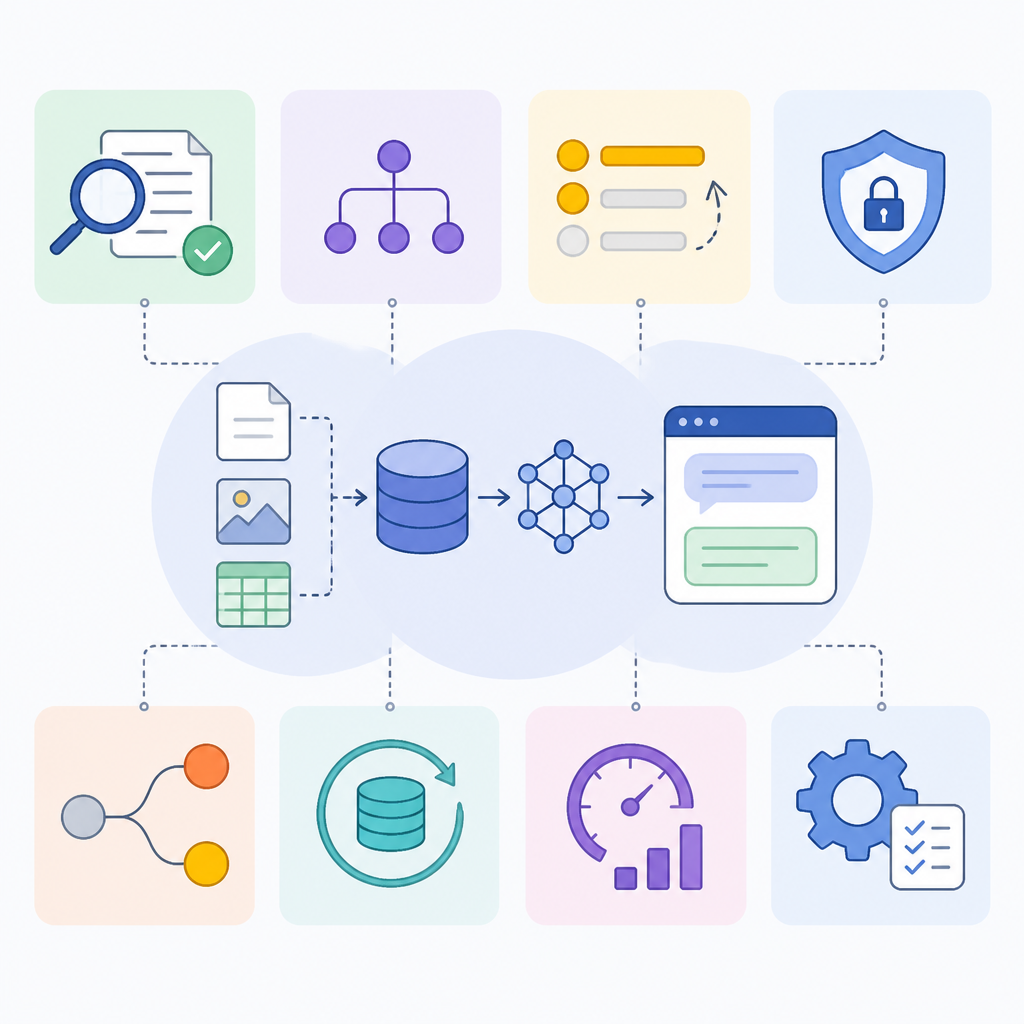
The useful mental model is failure-mode first. If retrieval misses exact names, you need sparse search. If the right passage is in the candidate set but not near the top, you need reranking. If the question is vague or compound, you need query transformation. If the answer depends on connecting entities across documents, you need graph structure. If one retrieval pass isn’t enough, you need an agentic loop. That’s not theory. That’s just me watching systems fail in the same boring ways over and over.
How to apply it: stop asking “which RAG stack should I use?” and start asking “what kind of miss am I seeing?” Then instrument the misses. Log query, retrieved chunks, final answer, and whether the answer was grounded. If you can’t name the failure, you’re not ready to add complexity. You’re just decorating the stack.
Naive RAG is fine until it isn’t
“Chunk your documents, embed them, store the vectors, then for each query embed it, retrieve the nearest chunks, and stuff them into the prompt.”
That’s the textbook pipeline, and honestly, it’s still the right place to start. I’m not going to pretend otherwise. For FAQs, clean policy docs, and simple lookups, naive RAG is cheap, fast, and easy to reason about. You can get something useful into users’ hands without spending two weeks arguing about architecture.
But the weakness shows up fast. Chunking is always a compromise. Too small, and you strip context. Too large, and retrieval becomes mushy. Dense retrieval is also bad at exact tokens, which is why it happily misses error codes, part numbers, legal citations, and product names that a human would find instantly with Ctrl+F. When that happens, the model fills the gap with something plausible. That’s the part that should make you nervous, not the retrieval metric on your offline eval set.
I ran into this on a support assistant where the top complaint was “it never finds the right article.” The model wasn’t dumb. The retrieval was. We had clean embeddings, a decent prompt, and still missed half the queries because users were typing codes and abbreviations the embedding model blurred together. The fix wasn’t a bigger model. It was adding sparse search.
- Use naive RAG when your corpus is small, clean, and question types are simple.
- Keep it as your baseline so you can measure whether later upgrades actually help.
How to apply it: build the simplest thing first, but make the failure visible. Track recall@k, answer grounding, and “no answer” cases. If you can’t tell whether the system missed the right chunk or the model ignored it, you’re debugging blind.
Hybrid retrieval fixes the stuff embeddings miss
“Hybrid retrieval combines dense vector search with sparse keyword search (BM25), then fuses the two result lists.”
This is the upgrade I wish more teams reached for earlier. Dense retrieval is good at meaning. Sparse retrieval is good at exactness. Enterprise data usually needs both. If your corpus includes product codes, names, acronyms, ticket IDs, or legal language, pure semantic search is leaving money on the table.

What this actually means is simple: don’t make embeddings do a job they’re bad at. Let BM25 catch the literal matches, let vectors catch the semantic ones, then fuse the results with something like Reciprocal Rank Fusion. That gives you a much better candidate set before the LLM ever sees anything. It’s boring. It’s also one of the highest-return changes you can make.
I’ve had this exact argument with teams that wanted to jump straight to “smarter” retrieval. Usually they already had a retrieval problem, not an intelligence problem. Once hybrid search went in, the system started finding the obvious answer more often, which is a weirdly underrated win. Users do not care that your architecture is elegant if it can’t find the document with the exact error code they typed.
- Use hybrid retrieval when exact terms matter alongside semantic meaning.
- Expect the biggest gains in corpora with jargon, codes, and proper nouns.
How to apply it: add BM25 to your stack before you add more LLM calls. If your vector database supports hybrid search natively, use it. If not, run separate retrievers and fuse the rankings. Then compare against your current baseline on real queries, not the ten examples you curated to make the demo look good.
Reranking is where “close” becomes “right”
“This two-stage pattern retrieves a broad candidate set, then runs a dedicated cross-encoder reranker … to reorder by true relevance.”
Reranking is the part people skip because it feels like an extra step. It is an extra step. That’s the point. The first retriever is optimized for recall. The reranker is optimized for precision. If the right chunk is somewhere in the top 20 but not the top 3, a reranker can rescue it. And in RAG, that difference is everything, because the model only gets a small slice of context anyway.
What this actually means is that you should stop expecting embeddings alone to decide final relevance. A cross-encoder reranker looks at the query and candidate together, which gives it a much better sense of actual fit. In practice, this often beats swapping to a more expensive embedding model. I’ve seen teams spend weeks debating embedding vendors when a reranker would have fixed the user-visible problem faster and cheaper.
I like reranking because it makes the system feel less random. Without it, retrieval can be annoyingly brittle: the right answer is in the pile, but not in the slice you passed to the model. With it, you’re buying a lot of precision for a modest latency hit. That trade is usually worth it unless you’re already fighting a tight p99 budget.
How to apply it: retrieve broadly, rerank narrowly. Start with top 20 to top 50 candidates, then pass the top few into generation. Measure whether your “answer found in retrieved context” rate improves. If it does, keep the reranker. If it doesn’t, your retrieval problem is probably earlier in the pipeline.
Query transformation is for messy humans
“Query transformation rewrites the user’s input before retrieval — expanding it, decomposing a compound question into sub-queries, or generating a hypothetical answer.”
This pattern exists because users are terrible at writing retrieval-friendly questions. I say that lovingly. They ask things like “compare the rollout plan and the incident policy for the new thing” and expect the system to magically know what “the new thing” is. It won’t. Not unless you help it.
What this actually means is that you can rewrite the query before retrieval so the retriever has a fighting chance. You can expand abbreviations, break a compound question into sub-queries, or create a hypothetical answer and embed that instead of the raw question. HyDE is useful here because it gives retrieval a richer semantic target than the user’s half-formed sentence.
I’ve used this when a support workflow kept failing on vague requests. The model wasn’t missing intelligence; the retrieval query was underspecified. Once we decomposed the input into smaller retrieval tasks, the hit rate improved without changing the underlying corpus at all. That’s the sort of fix I prefer because it doesn’t require re-indexing everything or rewriting the whole stack.
- Use query transformation when user inputs are vague, compound, or underspecified.
- Keep it selective, because every rewrite adds latency and another failure point.
How to apply it: only transform when the query shape justifies it. Don’t rewrite every request by default. Detect compound questions, ambiguous references, and acronym-heavy inputs, then route those through decomposition or expansion. That keeps the cost down and avoids turning a simple lookup into an expensive ceremony.
GraphRAG earns its keep on connect-the-dots questions
“GraphRAG builds a knowledge graph from your corpus — extracting entities and relationships, then clustering them into community summaries.”
This is where a lot of teams get seduced. GraphRAG sounds like the answer to everything because it feels structured and intelligent. Sometimes it is. But not for the reasons people think. The value shows up when the question is not “find me the relevant paragraph” but “connect these scattered facts across many documents.”
That’s the real distinction. Flat chunk retrieval is local. Graph retrieval is relational. If your users ask about themes across hundreds of reports, repeated references to the same entity, or how different documents relate to one another, a graph gives you a way to traverse those connections instead of hoping semantic similarity will stumble into them.
Microsoft open-sourced GraphRAG in July 2024, and the implementation uses LLM-driven entity extraction plus the Leiden algorithm for community detection. That’s not light machinery. It’s expensive to build and maintain, which is why I wouldn’t reach for it unless the query class actually demands it. I’ve watched teams adopt graph systems because they sounded more advanced, then discover their users mostly wanted exact answers from a single document. That’s a painful way to learn you bought a Ferrari for grocery runs.
How to apply it: only move to GraphRAG when you’ve proven that cross-document synthesis is the bottleneck. If you can answer the question with a better retriever and a reranker, do that first. Use the graph when the shape of the knowledge really is relational, not because you want prettier architecture diagrams.
Agentic RAG is powerful and annoyingly expensive
“Agentic RAG hands control to a reasoning loop: the model decomposes a complex query into sub-queries, decides which retrieval tools to call, runs them, evaluates what came back, and iterates.”
This is the pattern that gets the most hype and, frankly, the most misuse. Agentic RAG is useful when one retrieval pass clearly isn’t enough. Multi-hop research, deep investigation, and complex workflows can benefit from a loop that plans, retrieves, checks, and retries. That’s real value.
But the cost is not subtle. More orchestration means more latency, more token usage, more places for the system to drift, and more stuff to debug when it fails. The source article cites a May 2026 MLOps Community benchmark reported by RAG About It where agentic pipelines with knowledge graphs reduced hallucination by roughly 62% across 47 production deployments versus naive setups. That’s a strong signal, but I wouldn’t read it as “agents solve RAG.” I’d read it as “carefully designed orchestration can materially reduce bad answers when the task is complex enough.”
I’ve seen teams bolt on agents because they wanted the system to “think harder.” That’s usually a mistake. If retrieval is weak, an agent just makes the weakness more expensive. If the query only needs one or two documents, an agent is overkill. Use it when the workflow genuinely needs iterative tool use and verification, not as a default upgrade.
How to apply it: define the exact class of queries that need multi-step reasoning. Add budgets for latency, tokens, and retries. Then test whether the agent actually improves grounded answers on those queries. If it doesn’t, remove it. I know that sounds harsh, but I’d rather ship a boring system that works than a clever one that occasionally hallucinates with confidence.
Multimodal RAG is for knowledge that never fit in text
“Multimodal RAG retrieves across images, tables, audio, and video — not just text.”
Text-only RAG is fine until your source material isn’t text. Then it gets awkward fast. I’m talking about maintenance photos, scanned tables, product diagrams, call recordings, and video clips. If your users need answers from those assets, pretending everything is a paragraph is just self-sabotage.
What this actually means is that your retrieval layer has to understand multiple modalities, not just embed text chunks. That changes the indexing, the storage, the evaluation, and the failure modes. It’s useful, but it’s also operationally heavier than plain text RAG. You don’t want to discover that while standing up a critical workflow.
I’d treat multimodal RAG as a specialty pattern. If even a meaningful slice of your knowledge lives outside text, it’s worth the effort. If not, don’t build it because it sounds impressive. I’ve watched enough teams overbuild around edge cases they barely had to know that the urge is usually more ego than product need.
- Use multimodal RAG when images, tables, audio, or video are first-class inputs.
- Expect extra work in indexing, evaluation, and production monitoring.
How to apply it: inventory your source types before you choose the architecture. If the answer depends on screenshots, diagrams, or recorded calls, plan for multimodal retrieval early. If not, stay text-first and keep your stack simpler.
The template you can copy
# RAG architecture selection template for 2026

## 1) Start with the failure mode
- If users miss exact names, codes, IDs, or legal citations: add hybrid retrieval.
- If the right chunk is retrieved but not ranked high enough: add reranking.
- If queries are vague, compound, or underspecified: add query transformation.
- If wrong answers are expensive: add corrective / self-checking steps.
- If answers require connecting facts across many documents: evaluate GraphRAG.
- If one retrieval pass cannot gather enough context: evaluate agentic RAG.
- If the source material is not just text: evaluate multimodal RAG.

## 2) Recommended build order
1. Naive RAG baseline
2. Hybrid retrieval (dense + BM25)
3. Reranker
4. Query transformation for messy questions
5. Corrective / self-RAG for high-stakes domains
6. GraphRAG for cross-document synthesis
7. Agentic RAG for multi-hop workflows
8. Multimodal RAG when inputs are not text

## 3) Decision checklist
- Corpus size: ____________________
- Query types: _____________________
- Exact-match dependency: _________
- Cross-document reasoning needed: _
- Latency budget p95/p99: __________
- Cost per query target: ____________
- Traceability requirement: _________
- Non-text sources present: _________

## 4) Stack defaults
- Embeddings: OpenAI text-embedding-3-large for a safe default
- Embeddings for multilingual/open: Qwen3-Embedding-8B
- Vector store for small-to-mid scale: pgvector in Postgres
- Vector store for heavier filtering/scale: Qdrant, Weaviate, or Pinecone
- Ranking: cross-encoder reranker after broad retrieval
- Query rewriting: only for ambiguous or compound queries

## 5) Practical routing rules
text
IF query contains codes, IDs, names, or exact terms
  THEN run hybrid retrieval

IF top results are semantically close but not actually relevant
  THEN rerank top 20-50 candidates

IF query has multiple clauses or unclear references
  THEN transform into sub-queries

IF answer must be grounded and wrong answers are costly
  THEN add relevance grading / abstention

IF question requires synthesis across many documents
  THEN try GraphRAG

IF question needs iterative tool use or multi-hop reasoning
  THEN use agentic RAG with strict budgets

IF source content includes images, tables, audio, or video
  THEN use multimodal retrieval


## 6) Production guardrails
- Log original query, transformed query, retrieved chunks, reranked chunks, final answer.
- Track answer grounding and citation coverage.
- Measure recall@k, MRR, latency, and cost per query.
- Add an abstain path when confidence is low.
- Re-evaluate after every embedding, chunking, or retriever change.

## 7) My default recommendation
- Start with naive + hybrid retrieval.
- Add reranking before adding agents.
- Add query transformation only for messy queries.
- Add GraphRAG or agents only when the query class proves you need them.
- Use multimodal only when the source material demands it.
This is the version I’d actually hand to a team. It forces the conversation away from “which trendy architecture should we use?” and toward “what failure are we fixing?” That shift alone saves a lot of wasted time. It also keeps you from overbuilding a system that only needed better retrieval and a reranker.
If I were starting a new RAG project tomorrow, I’d begin with naive retrieval, add hybrid search immediately if the corpus has exact terms, and then put a reranker on top. I’d only reach for query transformation, GraphRAG, or agents after I had logs proving the simpler stack was missing a real class of questions. That’s the part people skip, and then they act surprised when the fancy version is slower, harder to debug, and only marginally better.
The original article is How to Build RAG Systems in 2026: 8 Architecture Patterns on AIThinkerLab.com. My breakdown is derivative of that source, with my own implementation advice, opinion, and selection template layered on top.
// Related Articles
- [AGENT]
Kimi K3 Benchmark Evaluation Guide for Coding Agents
- [AGENT]
Meta’s first paid model proves AI coding is now a price war
- [AGENT]
Claude Code turns chat into terminal work
- [AGENT]
Decentralized AI compliance should be built into agent rails, not bol…
- [AGENT]
Open-Source AI Agent Frameworks Compared
- [AGENT]
Codex Micro turns a macropad into an AI control deck